
Sync B2B Quotes to Salesforce | QuoteSnap
B2B commerce rarely lives inside an e-commerce storefront alone. While wholesale customers submit quote requests directly on your store, sales representatives spend their working hours inside a CRM managing accounts, tracking opportunities, and negotiating deal terms. For growing businesses, bridging that gap usually involves manual data entry: copying line items, pasting billing addresses, re-entering contact information, and downloading PDFs.
That friction slows down response times, introduces costly pricing errors, and pulls reps away from active selling. With QuoteSnap’s native Salesforce integration, every quote submitted on your storefront instantly creates and updates structured records across your Salesforce – eliminating manual handoffs so your team can focus on closing deals.
Salesforce CRM Integration: Key Features & Sync Capabilities
QuoteSnap connects securely to your Salesforce org using the OAuth Client Credentials Flow, running background syncs through a designated “Run As” user without requiring ongoing manual logins.
Here is what QuoteSnap automatically synchronizes when a buyer submits a quote:
- Account & Contact Sync: Creates new accounts or updates existing company records (name, account number, phone, addresses) and automatically links matching contacts by email.
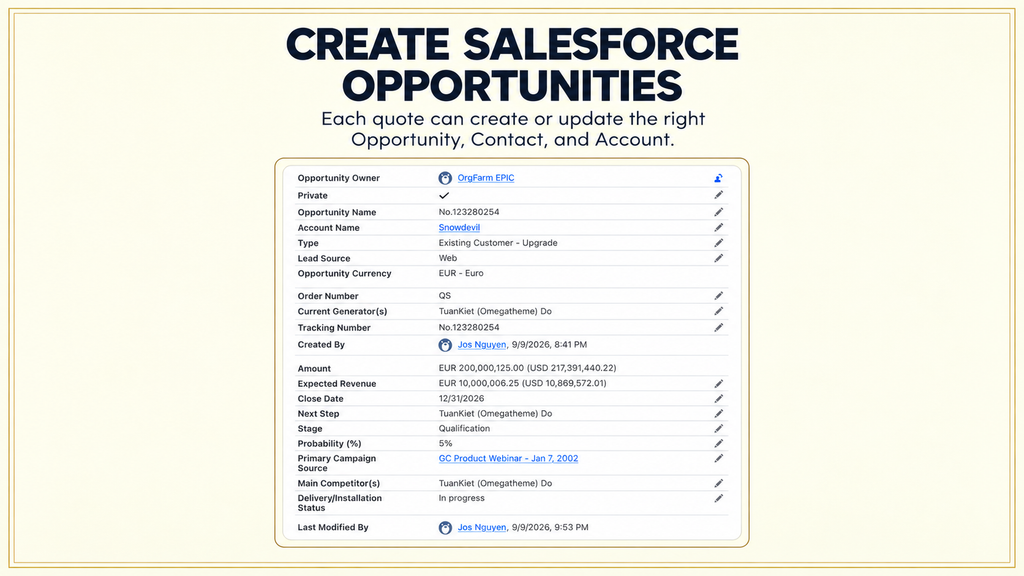
- Opportunity Generation: Creates the primary deal record complete with stage, owner, quote value, close date, admin deep link, and full quote summary.
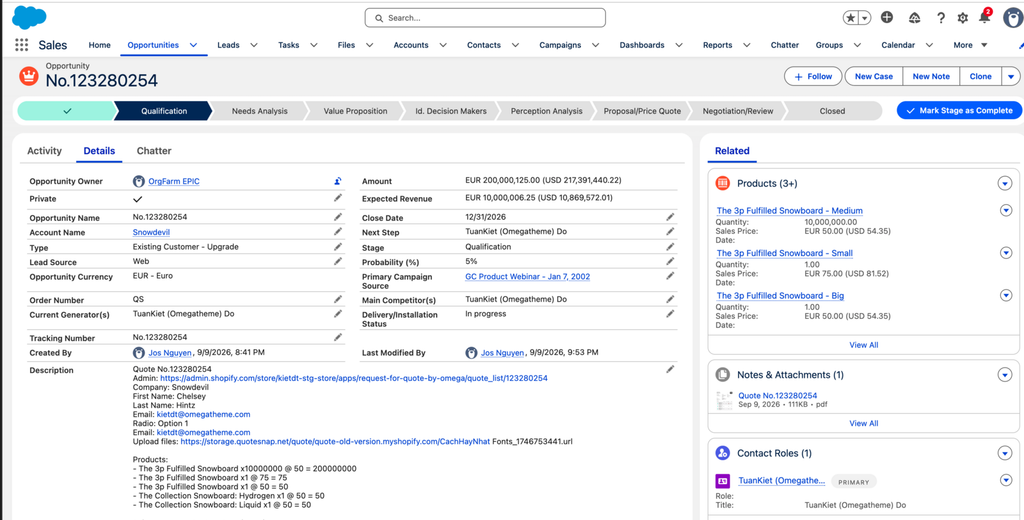
- Opportunity Line Items: Converts quote items directly into Opportunity line items, calculating overall amounts and carrying forward product notes and custom properties.
- Granular Discount Mapping: Passes per-line discounts as percentage values and logs quote-level discounts as dedicated line items to keep Salesforce totals aligned.
- Automated PDF Attachments: Renders and attaches the finalized quote PDF directly to the Opportunity’s Files, replacing prior files on re-sync to prevent duplicate clutter.
- Custom Field Mapping: Maps store and form values to standard or custom Salesforce fields using dynamic values (“From quote”) or constant rules (“Fixed value”).
- Intelligent Error Handling: Skips invalid individual fields or handles duplicate matching rules gracefully so a single field mismatch never halts the sync.
Why Salesforce Integration Matters for B2B E-Commerce Stores
Modern B2B buyers expect fast turnaround times on customized quotes, while enterprise sales operations demand clean, centralized reporting. Connecting QuoteSnap directly to your CRM infrastructure delivers measurable efficiency gains across both fronts:
- Accelerated Quote-to-Close Velocity: Sales reps receive incoming quote opportunities immediately in Salesforce, cutting response lag from hours to seconds.
- Zero Manual Data Entry: Eliminates transcription errors across SKUs, custom line properties, quantities, and customer shipping destinations.
- Unified Sales Reporting: Tracks e-commerce quote volume, pipeline conversion rates, and gross deal values directly in native Salesforce dashboards.
- Frictionless Team Collaboration: Equips account executives with the full commercial context – including active quote PDFs – without requiring store admin access.
How to Connect QuoteSnap to Salesforce: Step-by-Step Setup Guide
Connecting QuoteSnap to your Salesforce environment takes only a few minutes. Before starting, ensure you have Salesforce System Administrator access to configure an External Client App, permissions for the Client Credentials Flow, and an active user profile with write permissions for Accounts, Contacts, and Opportunities.
Step 1: Create an External Client App in Salesforce
- In Salesforce, navigate to Setup → App Manager → New External Client App.
- Under API (Enable OAuth Settings), enable OAuth and select the api and refresh_token scopes.
- Enable the Client Credentials Flow and assign your designated Run As user.
- Save the app, open Consumer Key and Secret, and copy both credentials.
Step 2: Connect Your Salesforce Org in QuoteSnap
- In your QuoteSnap admin panel, go to Others → Sync Data → Salesforce.
- Enter your Salesforce Instance URL (e.g.,
[https://your-org.my.salesforce.com](https://your-org.my.salesforce.com)). - Paste the Consumer Key and Consumer Secret.
- Click Verify connection to test credentials and load your org’s schema, fields, stages, and active users.
Step 3: Configure Objects and Field Mappings
- Toggle Objects: Enable any combination of Account, Contact, and Opportunity sync based on your sales workflow.
- Set Field Rules: Map standard and custom Salesforce fields using either dynamic quote values (such as quote totals or custom quote form fields) or fixed defaults (such as setting an opportunity close date to
+N days after sync). - Enable Product & File Sync: Turn on “Create Opportunity line items from quote products” and “Attach the quote PDF to the Opportunity”.
- Save your mapping configuration to activate automated syncing.
(Note: You can disconnect the integration at any time from the top-right of the Salesforce settings page. Disconnecting clears credentials and mapping rules without altering records already created in Salesforce.)
Ready to Streamline Your B2B Quote Workflow?
Stop losing selling hours to manual CRM updates. Connect QuoteSnap to Salesforce today to turn inbound store quotes into actionable CRM deals instantly.
Need assistance configuring your field mappings or setting up your External Client App? Reach out directly to our support team via live chat in your QuoteSnap dashboard or reply to our setup email – we are here to help.
Automate your B2B quote-to-pipeline workflow
Stop losing valuable selling time to manual data entry. QuoteSnap instantly pushes incoming storefront quotes directly into Salesforce as Accounts, Contacts, and Opportunities – complete with product line items, accurate discount calculations, and attached quote PDFs.
Connect QuoteSnap to Salesforce