
QuoteSnap Is Safe: Shopify Checkout Hijacking Update
QuoteSnap is safe. QS Request a Quote, Hide Price and QuoteSnap B2B Wholesale Price List was not affected by the Shopify checkout hijacking in October 2026.
For B2B and wholesale stores, this matters twice: quotes often carry larger order values and company details. Here’s why QuoteSnap was never at risk:
- No custom checkout JavaScript. QuoteSnap adds a quote button and form to your storefront. Nothing it runs can change where a shopper goes at checkout.
- Native Shopify checkout. When a quote is accepted, payment happens through a Shopify draft order and Shopify’s own checkout.
- Validated content. Every form field, label and setting QuoteSnap shows on your store is validated before it’s generated, so no harmful JavaScript can be initialized.
There’s nothing you need to change or reinstall.
What happened in the Shopify checkout hijacking
Between October 10 and 14, 2026, three Shopify apps were compromised and used to send shoppers to fake card-entry pages: Hulk Product Options, Selleasy and Swym Wishlist Plus. In each case, someone gained access to the app’s own systems and changed the settings or scripts the app delivers to storefronts. A shopper clicking Checkout was sent to a look-alike payment page, such as one on biliing[.]top, then passed on to the real checkout so the order looked normal.
Shopify’s checkout itself was not breached. As Tribe put it in their review of the incident, “every app on your storefront runs code that someone else controls.” That’s the right question to ask of any app, including ours, so here is exactly what QuoteSnap runs on your store.
How a QuoteSnap quote becomes a paid order
The hijacking targeted one moment: a shopper clicking Checkout. In a quote flow, that click doesn’t exist in the usual form. Here’s the path a QuoteSnap quote takes from request to payment:
- The buyer requests a quote. Instead of Add to Cart, they see a Request a Quote button and fill in your quote form. Nothing is paid at this step.
- You review and price the quote in the QuoteSnap dashboard, then export it as a PDF or convert it to an order.
- QuoteSnap creates a Shopify draft order. The draft order syncs to Shopify Orders, with the quote ID in the notes if you add it.
- The buyer pays on Shopify’s checkout. The invoice email’s Complete your purchase link opens your store’s native Shopify checkout at the agreed price.
At no point does QuoteSnap host a payment page, ask for card details, or run a script that decides where the buyer goes to pay. The payment step belongs to Shopify from start to finish.
Why the QuoteSnap button and quote form can’t carry malicious code
The confirmed incidents all followed one pattern: content an app delivered to the storefront, such as a custom JavaScript setting or a button label, was run by the browser without being checked. QuoteSnap puts several things on your storefront too, so we looked at each one:
| What QuoteSnap shows on your store | How it’s protected |
|---|---|
| Request a Quote button and its label | Validated before it’s generated on your store, so the label can only ever be text |
| Quote form fields, placeholders and messages | Validated the same way; no field can inject a script into the page |
| Hide price and hide Add to Cart rules | Apply display rules only; they never touch the checkout or redirect the shopper |
| Data buyers type into the form | Treated as untrusted input and stored as data, never run as code |
In short: every piece of information QuoteSnap generates on your store is validated first, so no harmful JavaScript can be initialized, and QuoteSnap runs no custom checkout JavaScript at all.
Is QuoteSnap affected by the PHP or Node.js vulnerabilities?
No. Two server-side vulnerabilities were disclosed on October 21, 2026, separate from the checkout hijacking:
- PHP “PHP2Shell” (CVE-2026-109618 and CVE-2026-109619), which could allow remote code execution on unpatched PHP servers. QuoteSnap’s systems have no exposure.
- Node.js (CVE-2026-111497 and nine other issues). Every QuoteSnap service running Node.js was patched on October 22, 2026, the day after the fixes were released.
This matters for quote data in particular, since QuoteSnap syncs quotes with Shopify, HubSpot and ERP systems through our servers. QuoteSnap is part of the OmegaTheme ecosystem, which operates under SOC 2 Type II security controls; the OmegaTheme Trust Center lists the details.
How to check your Shopify checkout if you sell by quote
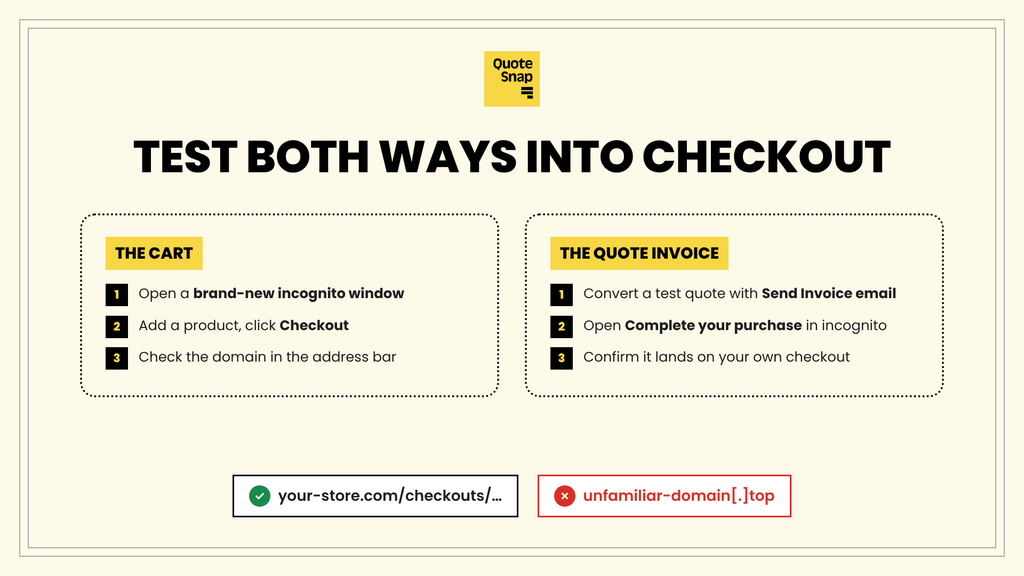
Quote-based stores have two ways in to checkout: the normal cart (if you keep it for some products) and the invoice link in a quote. Test both.
Test the cart checkout
- Open a brand-new incognito window. The malicious scripts fired once per browser session, so your usual browser can hide them.
- Add a product that still has Add to Cart, then click Checkout. Try the cart drawer and the cart page too.
- Check the address bar. It should stay on your store’s domain or
myshopify.com, for exampleyour-store.com/checkouts/…. An unfamiliar domain, especially one ending in.top, means your store is affected.
Test the quote invoice link
- Create a test quote and convert it to a draft order with Send Invoice email checked, sent to your own address.
- Open Complete your purchase from that email in an incognito window.
- Confirm it lands on your own checkout domain, with the quoted price.
Then tighten access
- In Shopify admin > Apps, uninstall apps you no longer use, and clear any custom JavaScript or HTML settings you don’t need.
- Change your Shopify and app account passwords and turn on two-step authentication for every staff account.
- Review which staff, agencies, integrations and AI tools can access your store, and remove what you don’t need.
- Tell your B2B buyers which email address your quotes and invoices come from, so they can spot a fake.
If something redirects
Switch off app embeds one at a time in Online Store > Themes > Customize > App embeds and re-test until it stops. Contact any customers who may have entered card details on a fake page, then report it to Shopify Support and the app’s developer with screenshots and the fake address.
Keep quoting with confidence
B2B buyers trust you with large orders and company details, and you trust us with the step between their request and your sale. We take that seriously: QuoteSnap never touches where your buyers pay, and nothing it puts on your storefront goes out unchecked. We’re applying the security requirements Shopify announced on October 20, 2026, and we’ll update this post if anything changes.
Questions about your store? Reach our team 24/7 from inside QuoteSnap, through the contact page, or in the help center.
