
Meet the QuoteSnap AI Agent: Fast In-App Navigation for Busy Merchants
Managing custom quotes, customer permissions, and email templates shouldn’t require clicking through layers of nested dashboard menus. When managing a high-volume B2B or wholesale catalog on Shopify, every minute spent searching for configuration options pulls your attention away from processing quote requests and closing sales.
To streamline your daily store operations, we launched the QuoteSnap · Quote Agent – a smart in-app assistant designed to take you straight to the exact configuration screen you need simply by typing a prompt or clicking a suggestion.
Key Features of the QuoteSnap AI Agent: Direct In-App Navigation
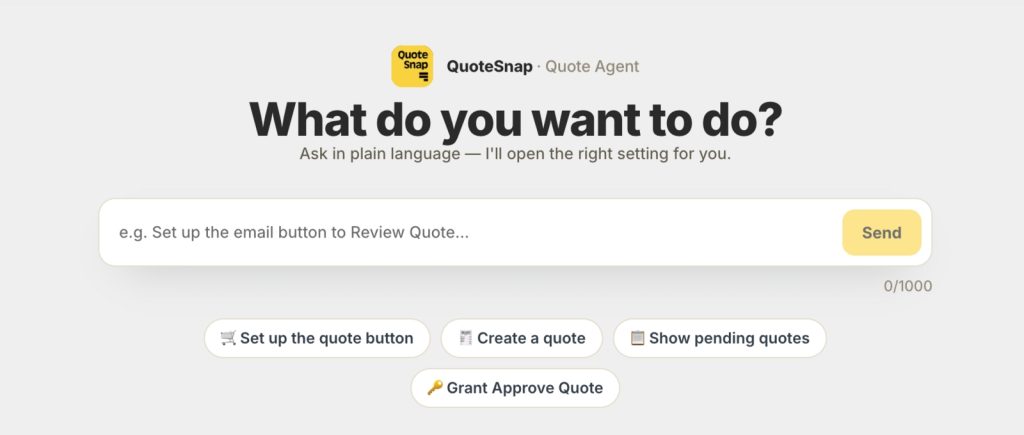
The AI Agent sits prominently on the QuoteSnap homepage under the “What do you want to do?” section. It turns complex menu trees into a conversational navigation assistant that gets you where you need to go immediately.
- Natural Language Navigation: Type your exact goal into the chat input (such as “Set up the email button to Review Quote”) and hit Send.
- One-Click Quick Suggestions: Pick from instant shortcut prompts right below the input field, including Set up the quote button, Create a quote, Show pending quotes, and Grant Approve Quote.
- Direct Deep-Linking (“Open” Button): The Agent replies with a short summary of where you need to go and generates an Open button that links directly to the relevant settings page (e.g., Quote settings, Analytics, Members and permissions).
- Smart Follow-Up Prompts: If your request requires more precision – such as asking to modify an email notification without specifying which template – the Agent asks a quick follow-up question to identify the right destination.
- Session History with Expand/Collapse View: Your chat history is preserved throughout your active session, complete with an expandable view so you can easily review previous steps and retrace your route.
- Safe Routing Control: The Agent functions purely as an intelligent navigator—it routes you directly to the appropriate screen without modifying any store settings or data automatically.
Why AI-Driven Navigation Optimizes Shopify Quote Management
As your store scales and quote workflows become more customized, operational speed and administrative clarity become critical to maintaining healthy turnaround times.
Eliminated Menu Friction & Faster Task Completion: Instead of navigating through sub-tabs to locate specific quote button settings or permission toggles, your team can access target admin screens in seconds.
- Smoother Staff Onboarding & Daily Delegation: Store managers and support teams no longer need to memorize every corner of the app settings to manage quotes, review pending submissions, or update email layouts.
How to Use the QuoteSnap AI Agent in Your Shopify Admin
The QuoteSnap AI Agent is available directly inside your app dashboard with zero setup required.
- Locate the Agent: Open the QuoteSnap app and find the QuoteSnap · Quote Agent box on the homepage under “What do you want to do?”.
- Type a Request or Pick a Suggestion: Enter your prompt into the chat box (e.g., “Set up the email button to Review Quote…”) and click Send, or click any quick suggestion like Show pending quotes.
- Follow Prompts & Click Open: Answer any clarifying questions if prompted, then click the Open button in the Agent’s response to jump directly to your destination.
Ready to speed up your quote management workflow? Open QuoteSnap in your Shopify Admin and try the AI Agent today.
