
New in QuoteSnap: Control how many quotes customers can send
As your business grows, so does the volume of your inquiries. While more quotes usually mean more opportunities, not every request is a high-quality lead. Dealing with low-intent inquiries or quantities that don’t fit your business model can drain your team’s time and energy.
To help you stay in control and prioritize serious buyers, we are excited to introduce our latest feature: Quote Quantity Limits.
What is Quote Quantity Limit?
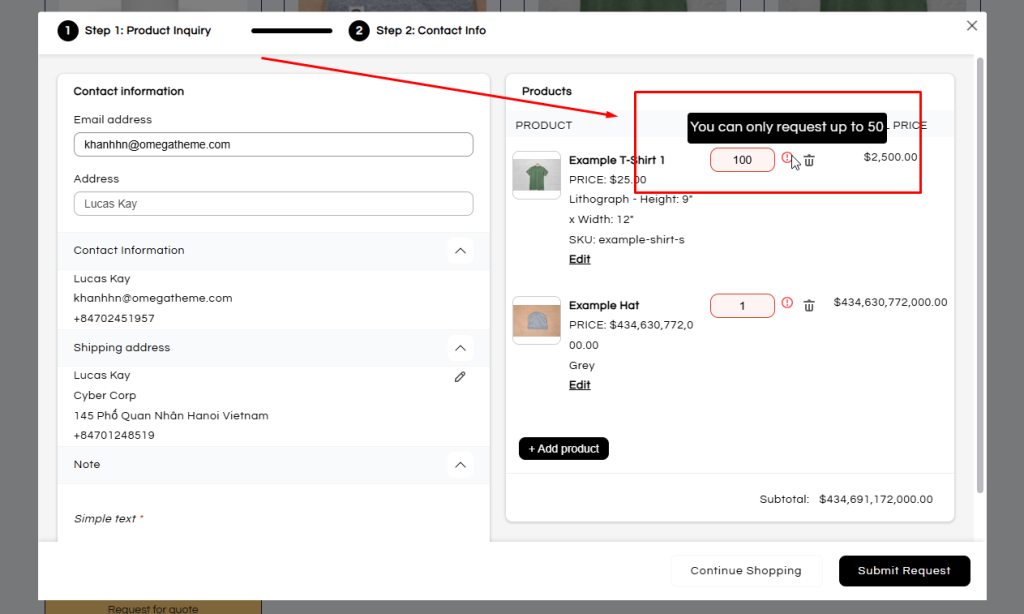
The Quote Quantity Limit feature allows you to set clear boundaries on how many units of a product (or specific variant) a customer can request in a single quote. Instead of handling “out of bounds” requests manually, QuoteSnap does the heavy lifting for you by validating quantities before the quote is even submitted.
This feature is a game-changer if:
– You receive too many low-quality quote requests
– Your team spends time responding to quotes that never convert
– You want to prioritize serious buyers and high-intent inquiries
Two Ways to Manage Your Quote Flow
We’ve made this feature flexible to fit different inventory and sales strategies. You can now set limits in two distinct ways:
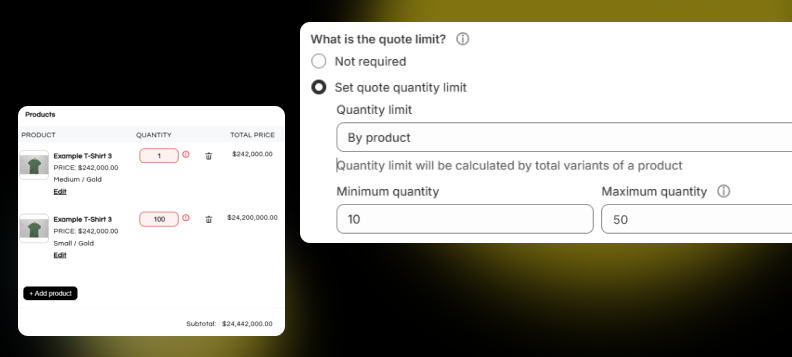
1. Limits by Product
This option applies a limit to the combined total of all variants selected for a single product.
- Best for: When you want to limit the overall demand for a product, regardless of size, color, or material.
- Example: Set a minimum of 5 and a maximum of 50. A customer can mix 2 units of “Red” and 3 units of “Blue” to meet the minimum requirement.
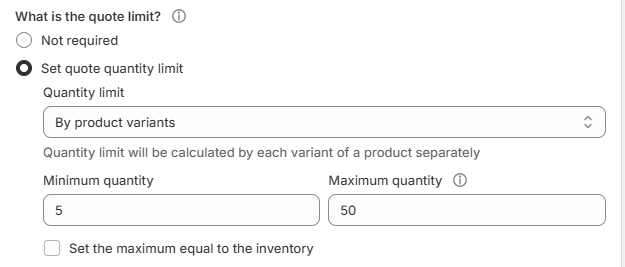
Limits by Product Variant
Limits are applied separately to each individual variant.
- Best for: When inventory or shipping restrictions differ significantly between specific versions of a product.
- Example: You may require a minimum of 10 units for a “Custom Engraved” variant, but allow 1 unit for a “Standard” variant.
Smart Inventory Integration
We know inventory management is a balancing act. That’s why QuoteSnap allows you to:
- Sync with Shopify Inventory: Set your maximum quote limit to match your actual stock levels automatically.
- Manage Out-of-Stock Items: Choose whether or not to allow customers to request quotes for items that are currently out of stock.
- Custom Validation Messages: You can fully customize the warning messages (using variables like
{min_quantity}) to guide your customers in their native language.
The Quote Quantity Limit feature is now available to all users on the Starter Plan. By upgrading, you also unlock:
- Increased quote capacity.
- Advanced “Hide Price” and “Add to Cart” controls.
- Seamless Quote-to-Order conversion to close deals faster.
If you’re ready to manage your quotes more intentionally and save your team hours of manual work, this feature is the perfect place to start.
Need a hand? We’ve prepared a helpful step-by-step document to guide you through the setup. As always, our support team is just a chat away if you have any questions!
